

One Workspace
Launch multiple AI agents from the same operational home.
Configure specialized assistants and deploy them across WhatsApp, Instagram, and your website—without writing code.
No infrastructure setup required.
Your friendly AI agent, ready to answer, summarize, and automate.
Connected tools
Product showcase
See the real platform across bots, contacts, data sources, automation, and the live widget experience.
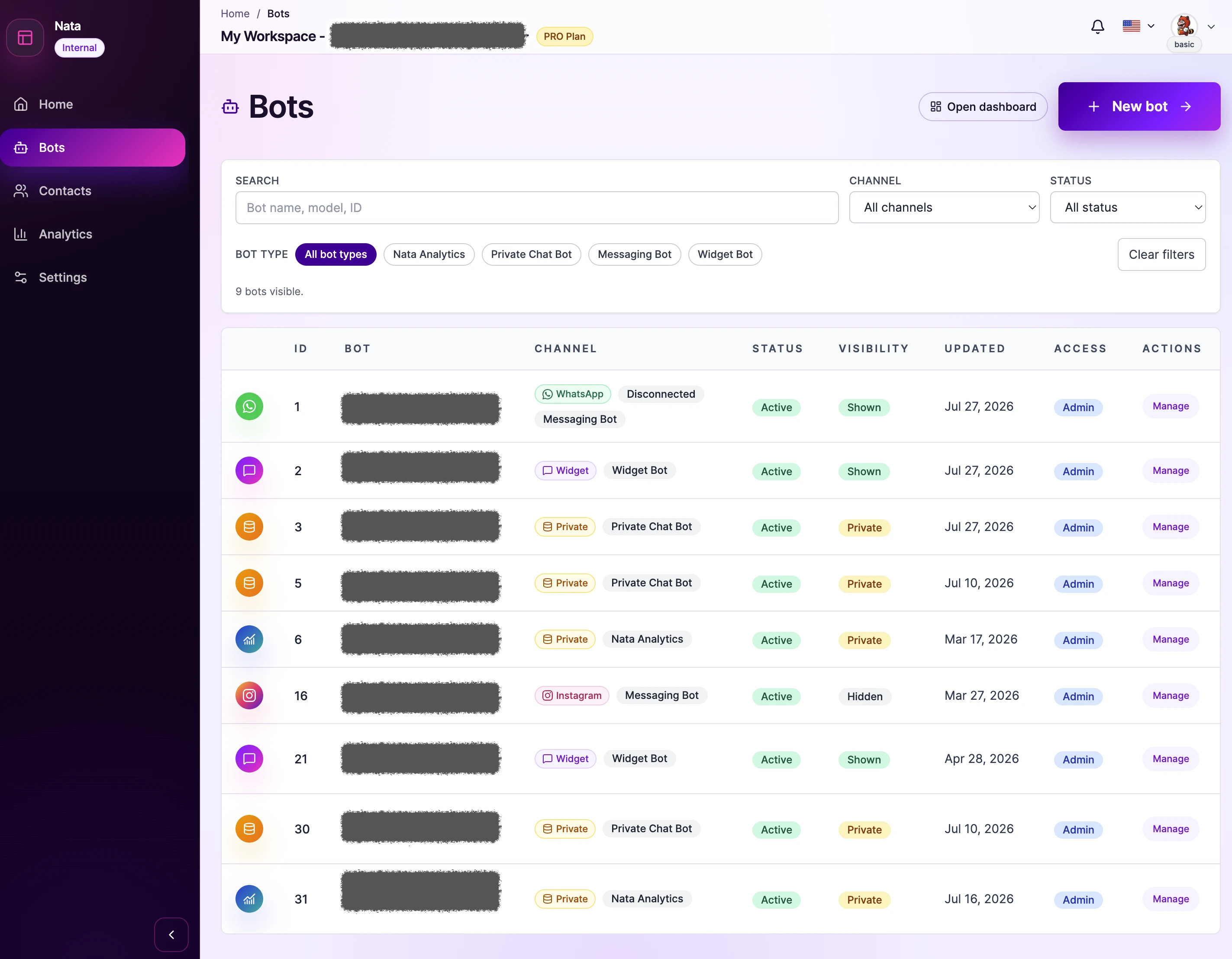
01 / 06
Launch specialized agents for support, sales, knowledge, and analytics without splitting teams across disconnected tools.
Start with one use case, then add more agents as your business grows.
Use the arrows, swipe on mobile, or use your keyboard to explore the platform.
What is Nata AI
A shared platform for agents, business context, and operational control.
Launch multiple AI agents from the same operational home.
Keep trusted business information available across agents.
Manage channels, permissions, and rollout from one place.
Every agent lives in the same connected workspace.
A single workspace can host multiple agents, each with a clear role.
Answer repeat customer questions consistently across channels.
Capture, qualify, and route new opportunities.
Help teams find reliable answers from company information.
Ask business questions in natural language and get clear answers.
A simple path from workspace setup to launch.
Set up the shared home for your team and operations.
Start with the first role your business needs most.
Bring in business information and the channels you already use.
Launch, learn from usage, and expand when you are ready.
Quick answers for business teams evaluating Nata AI.
You can use Nata AI for customer support, sales capture, internal knowledge, analytics, and workflow automation from one workspace.
Most teams can create a workspace, connect knowledge, and launch a first use case quickly without infrastructure setup.
Yes. You can create specialized AI agents for support, sales, knowledge, analytics, and other workflows inside the same platform.
Nata AI supports website experiences, WhatsApp, Instagram, Telegram, and connected business data sources.
Yes. You can connect business information such as PDFs, Google Drive, Google Sheets, CSV files, and databases.
Yes. Many teams start with one AI agent and then add channels, analytics, automation, and more teams over time.
Not necessarily. Nata AI is designed so business teams can start with a clear use case and expand as needed.
Launch your first AI workflow, then add more channels, knowledge, and teams as your business grows.